For years, 16GB of RAM was the safe, sensible choice for a business laptop. It handled email, a browser, and Office without complaint. Today’s machines are being asked to run AI tools, multiple browser windows, cloud apps, and collaboration platforms all at once, and 16GB simply cannot keep up anymore for a large share of everyday workers.
This is not about buying more than you need. It is about matching the machine to how work actually happens in 2026. Businesses that keep issuing 16GB laptops are not saving money. They are quietly taxing every employee who works a certain way, every single day, in lost time and frustration.
The New Normal: 32GB Is the Baseline
A decade ago, 8GB was standard and 16GB was for power users. Then AI assistants, browser-based software, and heavier collaboration tools crept into daily workflows, and 16GB became the new standard. That shift has happened again. 32GB is now the sensible baseline for a business machine, not a premium option reserved for designers or developers.
Three forces are driving this shift at the same time:
- AI tools run in the background constantly. Copilot, Claude, and browser-based AI assistants keep processes alive even when you are not actively prompting them, and they hold memory the whole session.
- Browser-based software has replaced desktop apps. CRMs, finance platforms, project tools, and even parts of the Microsoft 365 suite now run inside a browser tab rather than a native app, and each one carries its own memory overhead.
- Multitasking has become the default, not the exception. Hybrid work means more video calls, more shared screens, more simultaneous apps open than a typical workday ten years ago.
None of these forces are going away. If anything, AI tool usage is accelerating, which means the demand on RAM will keep climbing, not level off.
Why 16GB Used to Be Enough (And Why It Is Not Anymore)
16GB of RAM was simply enough for the software stack of its time. A typical workday a few years ago looked like one browser, a handful of tabs, Outlook, and Word running side by side. That workload works fine on a 16GB computer.
The problem is that the software stack has changed dramatically, but the hardware baseline in a lot of Australian businesses has not. Many organisations are still issuing 16GB laptops because that is what they have always bought, without checking whether that number still matches how staff actually work today. The result is a mismatch that shows up as slow app switching, laggy video calls, and staff quietly learning to live with a sluggish machine because they assume it is normal.
Two People, One Job, Two Very Different Experiences
Here is where this becomes concrete rather than theoretical. Picture two employees in the same role, on the same 16GB laptop, doing the same job. Neither one is doing anything wrong. They are simply working in different styles, and that difference in style has a dramatic effect on how their machine performs.
Person 1: The Browser-Heavy Multitasker
Person 1 works the way a lot of people naturally work when they are juggling several things at once. They keep three separate Chrome windows open, roughly ten tabs in each, alongside Word and PowerPoint for their actual deliverables. This might be three different projects, three different client accounts, or simply a habit of never closing anything until the task is finished.
Their way of working is a completely reasonable way to stay organised across multiple threads of work. However, all those open tab holds memory, and thirty tabs across three windows adds up fast, especially with extensions, trackers, and auto-refreshing pages running underneath each one.
Person 2: The Streamlined Single-Browser User
Person 2 does the exact same job, on the exact same laptop, but works differently. They keep one Chrome window open with two tabs, alongside the same Word and PowerPoint documents. They close tabs as soon as they are done with them and rarely have more than one task visibly open at a time.
This is not necessarily the “correct” way to work either. It suits some tasks and some personalities better than others. However, it is a lighter on system resources, simply because there is far less open and running in the background at any given moment.
The Same 16GB Laptop, Two Completely Different Realities
On a 16GB machine, the illustration below shows roughly what each person’s memory footprint looks like during a normal working session, split across Chrome, Word, PowerPoint, and the background processes every Windows machine needs to run.
Person 1 sits close to the 16GB ceiling before they have even opened anything unusual, leaving almost no headroom for a video call, a large spreadsheet, or a second monitor waking from sleep. Person 2 sits comfortably under half that load, with plenty of room to spare.
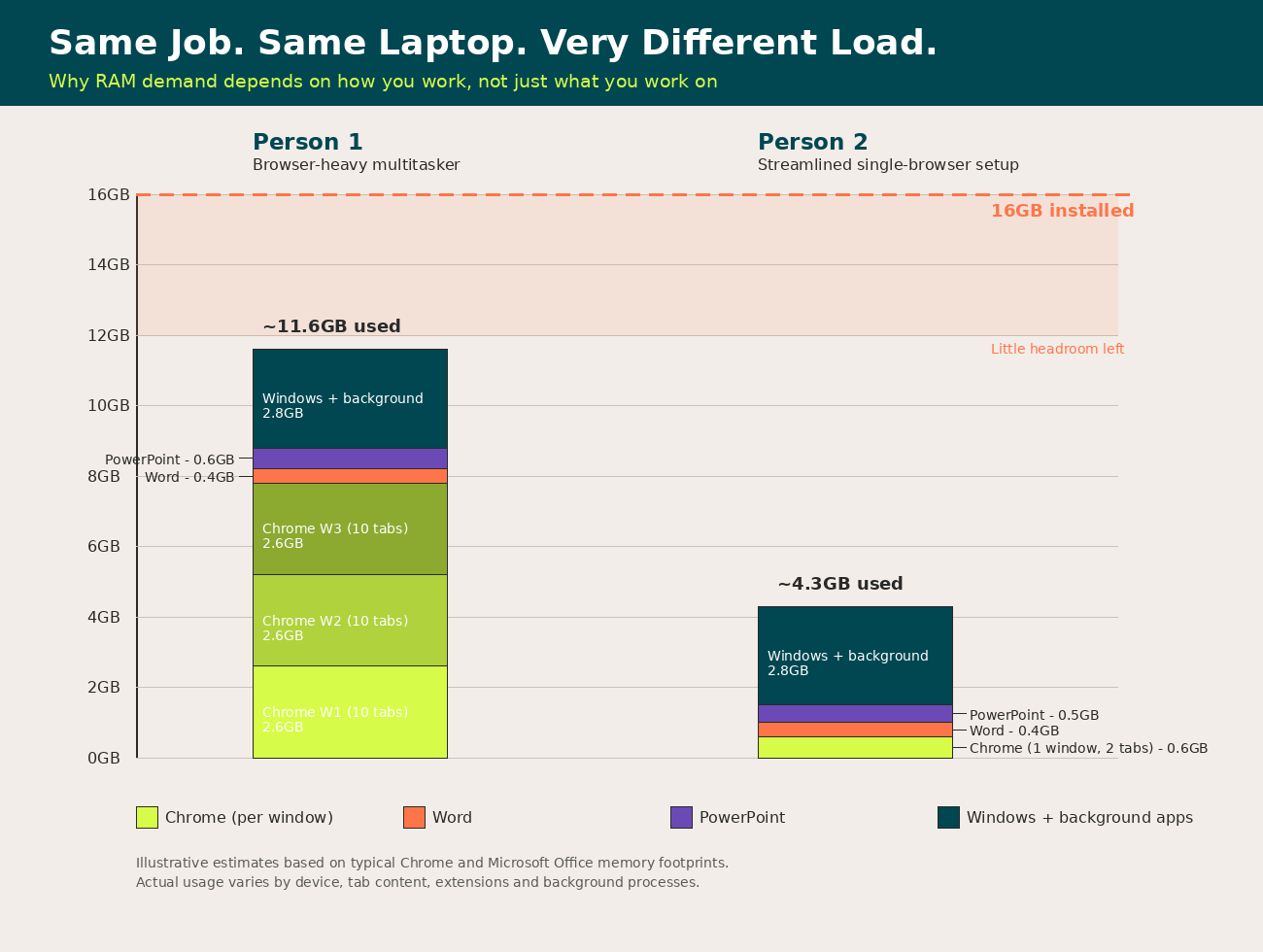
Person 1 has simply asked more of the machine, and a 16GB laptop has very little spare capacity to absorb that. The moment Windows needs to juggle background updates, a Teams call, or an AI assistant on top of Person 1’s existing load, something has to slow down or get pushed out of memory, and that is exactly when the laptop starts to feel sluggish, unresponsive, or prone to freezing mid-task.
What Actually Happens When RAM Runs Out
When a machine runs low on available memory, it does not simply stop operating. It starts swapping data out to the hard drive to free up space, a process that is dramatically slower than RAM itself. This is where the frustrating symptoms come from: a cursor that lags, a browser tab that needs to reload because it was pushed out of memory, or a save in Word that hangs for a few seconds longer than it should.
If a slow machine has other causes beyond memory, our guide on why your computer might be running slow covers the other common culprits. It shows up as a machine that just feels slow, day after day, in ways that are hard to pin down and easy to write off as “my laptop is just old” or “IT probably needs to fix something.” In reality, it is often simply a case of asking too much of too little memory, and no software fix will resolve that permanently.
Why This Matters More With AI Tools in the Mix
AI tools change this equation further, because they rarely sit idle in the background the way a closed application does. A browser-based AI assistant, a Copilot session, or an AI-powered plugin inside Word or Outlook holds memory for as long as the session is open, even during the quiet moments between prompts.
Layer that on top of Person 1’s existing thirty open tabs and three Chrome windows, and the AI tool becomes the straw that breaks the camel’s back. This is the practical reason 16GB no longer cuts it: it was never designed for a workday that includes constant AI assistance running alongside everything else.
What Businesses Should Actually Do About It
The fix here is not to lecture staff about how many tabs they should have open. Person 1’s working style is not the problem, and telling people to change deeply ingrained habits rarely sticks in practice. The fix is matching the hardware to the reality of how modern work happens.
- Set 32GB as the default specification for new laptop purchases, not an optional upgrade reserved for specific roles. A managed IT support partner can help set and enforce that standard across every device you buy.
- Audit current fleet age and specifications to identify which staff are on 16GB or lower and prioritise those refreshes first.
- Factor AI tool rollout into hardware planning. If your business is expanding Copilot or other AI assistant usage, treat that as a genuine capacity planning decision, not just a software licensing one.
- Stop treating slow machine complaints as user error. If staff are quietly working around a sluggish laptop, that is lost productivity that is easy to fix with the right specification.
The Cost of Getting This Wrong
A 16GB laptop is a false economy over the eighteen months that follow the purchase, once AI tools, browser-based platforms, and normal multitasking catch up with it. The cost shows up, in minutes lost to lag here and there, in help desk tickets that never quite get to the bottom of “my computer feels slow,” and in staff quietly adapting their working style around a limitation they should never have had to think about.
Otto IT works with businesses across Australia to right-size hardware specifications against how staff genuinely work, not just against a generic purchasing template. Our IT procurement services build laptop specifications around real usage patterns, not just list price. If your fleet was specified for a pre-AI workday, it is worth checking whether it still matches the one your team actually has now.
managed it support articles
Related Blog Articles
Discover more insights to optimise your business with the latest IT trends and best practices. Stay ahead of the curve by learning how to leverage cutting-edge technology for success. Explore expert advice and valuable guidance to navigate the evolving world of IT solutions