The ATO’s $20,000 Instant Asset Write Off has caught the attention of a lot of Australian businesses, and for good reason. It’s a simple way to reduce your taxable income while refreshing assets you probably needed to upgrade anyway. And for many organisations, IT equipment ends up being one of the most logical places to invest.
What the Instant Asset Write Off Actually Is

Who Can Use the Write Off?
Businesses need to ensure that they meet certain eligibility standards. Generally, companies with an aggregated turnover below a specific threshold can claim the benefit, which has historically included many small and medium-sized enterprises. For those in need of quick fixes or long-term IT Support and Managed Services, the write-off can be a game changer. It’s important to check current ATO guidelines or speak with your accountant, many find that staying updated with government guidelines, such as those on Business.gov.au, can prevent any confusion at tax time.
The rules can shift from year to year, but generally:
- Your business needs to fall under the ATO’s aggregated turnover threshold.
- The asset needs to cost less than $20,000.
- It needs to be used (or ready to use) in the same financial year you claim it.
It’s always worth checking with your accountant, as eligibility can be nuanced.
Practical Ways Businesses Can Use the Write Off for IT
Many organisations don’t realise how broad the eligible asset list can be. It’s not just “a new laptop”, although that absolutely counts. Below are some real examples of what Australian SMBs often buy under the $20,000 threshold.
- Hardware That Keeps Your Business Running
These are the obvious ones, but still worth mentioning:
- Laptops and desktops for staff
- Monitors, keyboards, docking stations
- Networking equipment (switches, routers, Wi-Fi upgrades)
- Servers or NAS devices for storage
- Point‑of‑sale systems
- Business-grade printers and scanners
For many businesses, simply replacing older, unreliable hardware can noticeably improve productivity.
Learn More about Otto’s IT Equipment Leasing
2. Cybersecurity Upgrades
A lot of cybersecurity tools qualify as eligible assets, especially when they involve hardware or software with a one-off purchase cost.
Examples include:
- Next‑generation firewalls
- Multi-factor authentication hardware keys (YubiKeys, etc.)
- Backup appliances
- Endpoint protection platforms (if purchased as perpetual licences)
- Security cameras and access control equipment
Given the rise in cyber incidents, many businesses use the write off window to tighten security.
Learn More about Otto’s Managed Cybersecurity Services
3. Modern Communication Tools
If your phone system is older than your coffee machine, this might be the year to upgrade.
- VoIP desk phones
- Microsoft Teams Calling handsets
- Video‑conferencing equipment
- Meeting room AV tech
Learn More about Otto’s Unified Communication Services
- Mobile phones for work use
- Portable projectors
- Field service tablets or handhelds
- Mobile hotspots or 4G/5G routers
- Hybrid cloud backup appliances
- Software licences with upfront costs
- Disaster recovery equipment
- New on‑prem or edge devices supporting cloud workloads
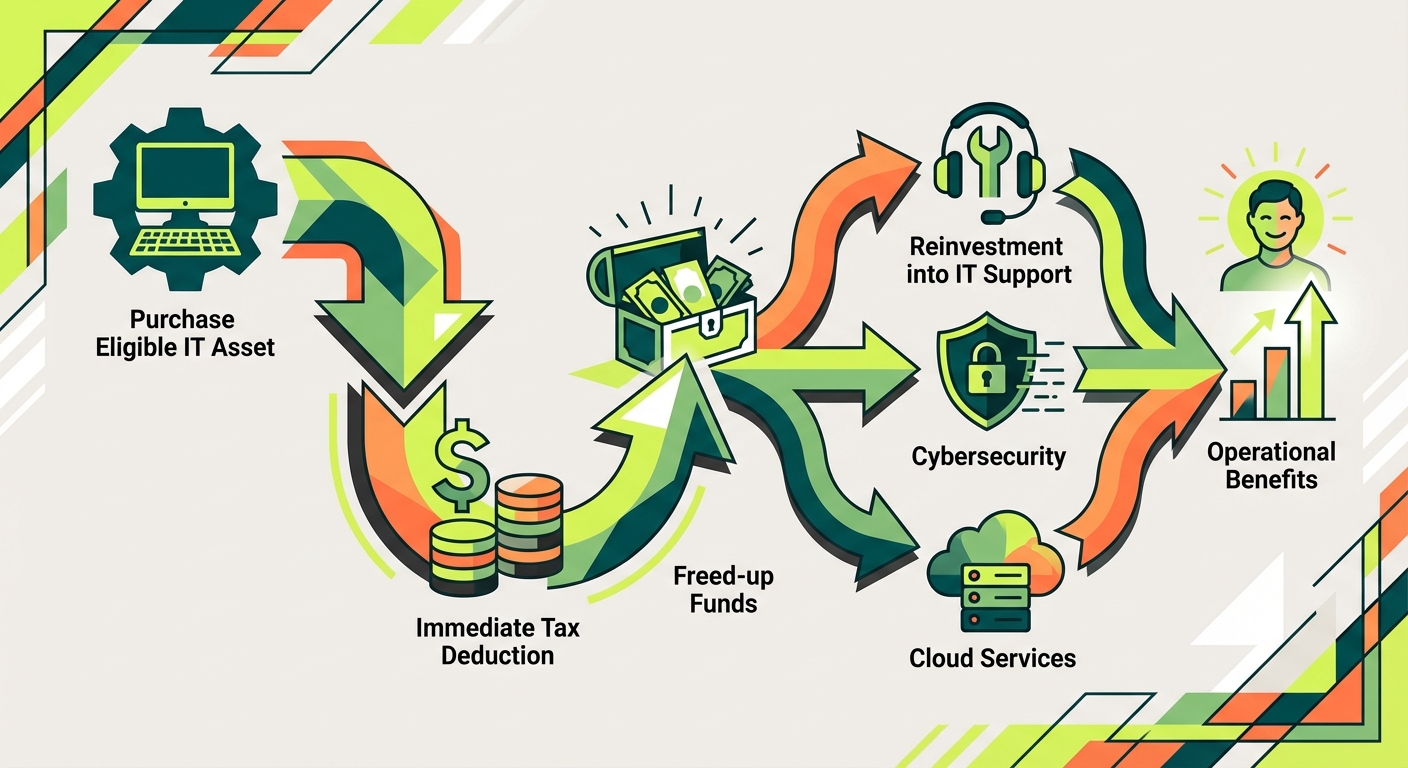
How the Write Off Fits Into Broader IT Planning
- Standardising hardware across the organisation
- Improving cybersecurity maturity
- Building a cleaner, consolidated IT environment
- Moving away from outdated legacy systems
- Supporting hybrid or remote work more effectively
When to Involve an IT Support Partner
For businesses that aren’t sure what to upgrade, or which assets will have the most impact, a conversation with a managed IT provider can help narrow the options.
Most businesses find it useful to get:
- A quick health check of their current environment
- A priority list of ageing or high‑risk assets
- A sense of which upgrades will give the biggest productivity improvement
- Advice on hardware vs cloud vs software eligibility
If you’re already planning improvements, aligning them with the write‑off period can stretch your budget further.
Final Thoughts
The $20,000 Instant Asset Write Off is one of those incentives that’s easy to overlook in the busyness of running a business. But with some thoughtful planning, it becomes a practical way to modernise your IT setup, strengthen security, and invest in tools that genuinely improve how your team works.
If you’d like help assessing which IT upgrades make sense for your organisation, or how to map them to your broader technology roadmap, the Otto IT team is always happy to talk through options in a non-salesy, plain-English way.
Disclaimer:
This information is general in nature and doesn’t take into account the specific circumstances of your business. Otto IT is not a financial adviser or accounting professional, and this article should not be considered tax or financial advice. We strongly recommend speaking with your accountant or qualified tax professional to understand how the Instant Asset Write Off applies to your individual situation.
managed it support articles
Related Blog Articles
Discover more insights to optimise your business with the latest IT trends and best practices. Stay ahead of the curve by learning how to leverage cutting-edge technology for success. Explore expert advice and valuable guidance to navigate the evolving world of IT solutions