The Short Answer
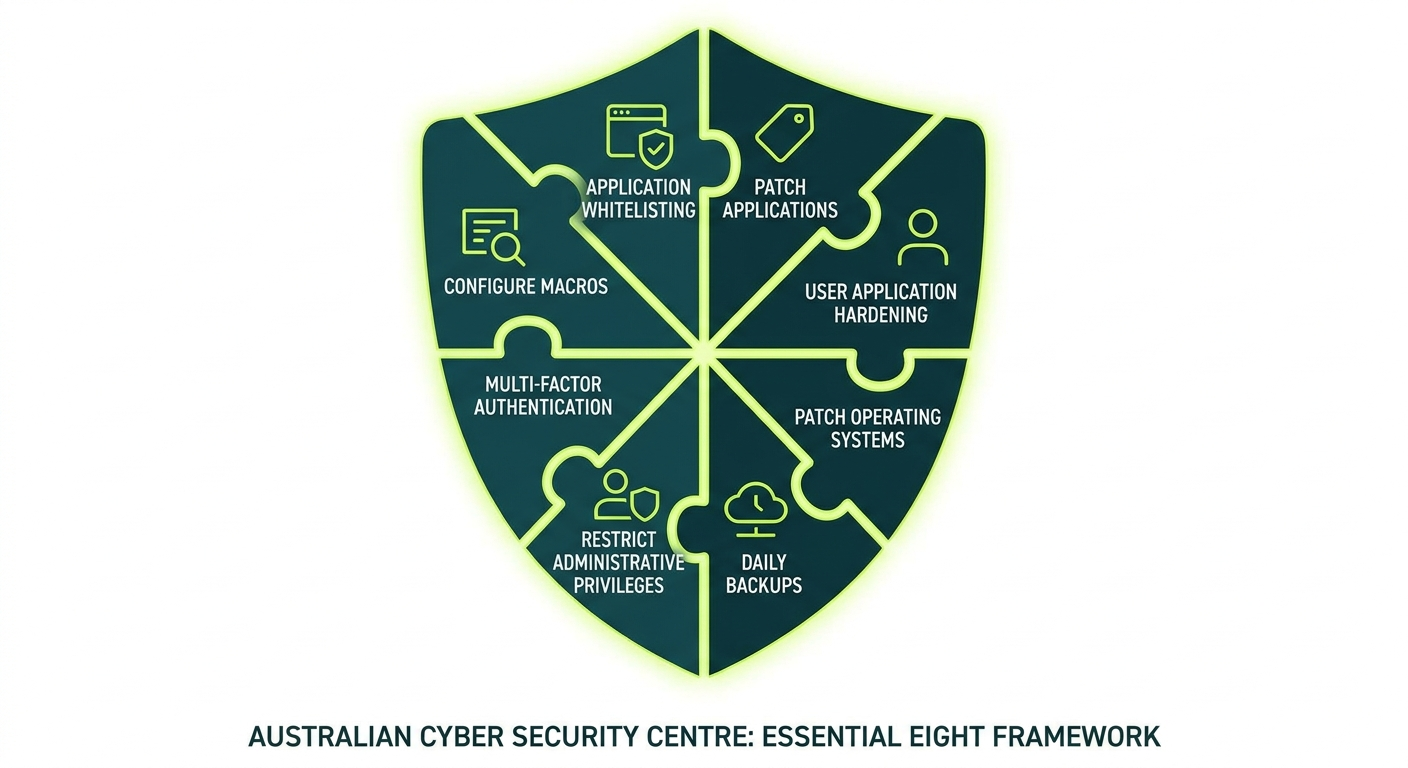
The Essential Eight is a set of eight cybersecurity measures developed by the Australian Signals Directorate (ASD) and its operational arm, the Australian Cyber Security Centre (ACSC). Think of it as the government’s recommended baseline for protecting your business from the most common cyber attacks.
It is not a law. It is not a certification. It is a framework, and whether you need to follow it depends on your industry, your contracts, and your appetite for risk.
What Is the ACSC Essential Eight, and Who Created It?
The Australian Signals Directorate (ASD) is Australia’s national intelligence and security agency. Among its responsibilities is helping Australian organisations protect themselves from cyber threats. The ACSC is the part of ASD that works directly with businesses and government agencies on practical cybersecurity.
In 2017, the ACSC published the Essential Eight as a prioritised list of mitigation strategies. The idea was straightforward: most cyber attacks exploit the same vulnerabilities. If you address these eight areas, you block a significant proportion of attacks before they can do damage.
The framework draws on real-world incident data. The controls were chosen because they are effective, achievable, and applicable to a wide range of organisations, not just government departments.
The ACSC updates the Essential Eight regularly as the threat landscape changes. If you are reading an older article about it, check whether the maturity level definitions reflect the current version, because they have been revised.
Is It Legally Required, or Just Recommended?
For most private sector businesses in Australia, the Essential Eight is recommended, not legally required.
There are exceptions worth knowing about:
- Federal government agencies are required to implement the Essential Eight as part of the Protective Security Policy Framework (PSPF). If you are a contractor or supplier to a federal agency, your contract may require you to meet specific maturity levels.
- Defence industry suppliers working with the Department of Defence may face requirements through the Defence Industry Security Program (DISP).
- Critical infrastructure operators are subject to the Security of Critical Infrastructure Act (SOCI Act), which mandates certain security obligations. The Essential Eight aligns well with those requirements, though SOCI compliance is broader in scope.
For everyone else: the Essential Eight is a best-practice framework backed by government research. Following it is smart risk management, not a legal obligation. That said, if a cyber incident occurs and you have not taken reasonable steps to protect your systems, that can affect insurance claims and potential liability assessments.
The 8 Controls Explained in Plain English
Here is what each control actually means, without the technical jargon.
1. Application Control
Imagine your office building has a strict visitor policy. Only approved people can enter. Application control works the same way for software: only approved applications are allowed to run on your computers. This blocks ransomware and malicious software from executing, even if someone accidentally downloads it.
2. Patch Applications
Software has bugs. Criminals exploit those bugs. Patching means regularly updating your software to close those security holes. Think of it like fixing a broken lock on your front door: the longer you leave it, the more time someone has to walk straight through. The ACSC recommends patching high-risk vulnerabilities within 48 hours of a patch being released.
3. Configure Microsoft Office Macro Settings
Macros are small programs embedded in documents like Word or Excel files. Criminals use them to deliver malware, often hidden inside what looks like a legitimate invoice or purchase order. This control restricts which macros can run and blocks untrusted ones from executing automatically. If your business does not rely on macros, this is one of the simpler controls to put in place.
4. User Application Hardening
Many attacks come through web browsers or document readers. Hardening means stripping those applications back to the minimum they need to function: disabling features that are rarely used but commonly exploited. It reduces your exposure without changing how your staff work day to day.
5. Restrict Administrative Privileges
Admin accounts are the master keys to your systems. If a criminal gets hold of one, they can do almost anything: install software, delete files, lock you out entirely. This control means limiting who has admin access and only using those accounts when tasks actually require them. Most employees, including most managers, should not have admin privileges on their everyday accounts.
6. Patch Operating Systems
Your operating system, whether Windows, macOS, or Linux, also needs regular updates. This is separate from patching your applications because the operating system itself can contain exploitable vulnerabilities. The ACSC recommends patching high-risk operating system vulnerabilities within 48 hours and using the latest supported versions wherever possible.
7. Multi-Factor Authentication (MFA)
You know the six-digit code your bank sends to your phone when you log in? That is multi-factor authentication. It means that even if a criminal steals your password, they still cannot get in without a second form of verification. This is one of the highest-impact controls available and one of the most practical to deploy. It applies to email, remote access, admin accounts, and any system that holds sensitive data.
8. Regular Backups
If ransomware encrypts your files, your backups are your escape hatch. This control requires that you back up your data regularly, keep backups isolated from your main systems so they cannot be encrypted too, and test that the backups actually restore correctly. A backup you have never tested is just hope wearing a hard drive’s clothing.
What the 3 Maturity Levels Mean in Practice
The Essential Eight uses a maturity model with three levels. Each level represents how consistently and robustly you have implemented the controls. Level 1 is the starting point. Level 3 is the most comprehensive.
For a detailed breakdown, read our dedicated guide: Essential Eight maturity levels explained.
Maturity Level 1: You have basic controls in place, but an attacker with moderate skill and patience could still get through. You are protected against opportunistic attacks, meaning automated tools scanning for easy targets, but not against a determined adversary who has chosen your organisation specifically.
Maturity Level 2: Your controls are more consistent and significantly harder to bypass. You are protecting against attackers who are specifically targeting your organisation and willing to invest real effort. This is where most private sector businesses should aim, particularly those in professional services, healthcare, or with government contracts.
Maturity Level 3: Your controls are comprehensive, actively managed, and regularly tested. You are defending against sophisticated, persistent attacks. This level is typically required for high-value targets: government agencies, defence contractors, financial institutions, and organisations holding large volumes of sensitive or regulated data.
Most small and medium businesses are working toward Level 1 or Level 2. If a government contract specifies a required level, that will be stated in the documentation.
Which Businesses Are Most at Risk Without It?
Any business that holds sensitive data, processes payments, or relies on digital systems to operate carries risk. That covers the majority of Australian businesses.
Some sectors face higher risk or higher consequences:
- Professional services firms: Accountants, lawyers, financial advisers, and consultants hold sensitive client data and are frequently targeted. A breach can destroy client trust and trigger regulatory scrutiny from bodies like ASIC or the ATO.
- Healthcare providers: Medical records are valuable on the black market. Practices without basic controls are attractive targets, and the consequences of a breach under the Privacy Act are significant.
- Construction and engineering firms: Increasingly targeted for intellectual property and project data, particularly those working on government or infrastructure projects.
- Retailers and hospitality businesses: Payment data and customer information make these businesses targets for financially motivated attacks.
- Businesses with government contracts: If you supply to federal agencies, you may be contractually required to meet a specific maturity level. A tender process or contract audit could expose gaps quickly.
The common thread is not headcount. It is data value and the consequences of a breach. A 30-person accounting firm can be a more attractive target than a 500-person manufacturing company, depending on what it holds and how well it is protected.
How Much Does Essential Eight Implementation Cost?
Here is the honest answer: it depends on where you are starting from.
Most businesses already have some controls in place, whether they know it or not. Multi-factor authentication might already be enabled on your Microsoft 365 accounts. Your IT team might already be patching software regularly. The cost is not always about starting from scratch.
Gap Assessment
Typically $1,500 to $5,000 for a small to medium business. This is usually a one-off exercise that produces a clear report showing your current maturity level against each control and what needs to change.
Getting to Maturity Level 1
For a business of 20 to 50 users with a reasonably modern IT environment, expect $5,000 to $20,000 in project work. This assumes a managed IT provider is handling most of the implementation.
Getting to Maturity Level 2
A more significant investment. Depending on your starting point, $15,000 to $50,000 or more is realistic for a business of that size, plus ongoing managed services costs to maintain the controls over time.
Ongoing Managed Services
If you use a managed IT provider to maintain your controls after implementation, this typically falls within your existing managed services agreement or adds a modest uplift, often $50 to $150 per user per month depending on scope and complexity.
These are not quotes. They are ranges based on what SMB implementation typically involves. Your actual cost depends on your systems, your current security posture, and the provider you engage.
What costs more than implementing the Essential Eight: a ransomware incident. Recovery costs for a small business include downtime, data restoration, and often an emergency incident response engagement. That bill starts at tens of thousands and can climb considerably higher.
How to Get Started: The Honest Answer
Start with an assessment.
You cannot fix what you have not measured. A proper Essential Eight gap assessment tells you exactly where you stand against each control and each maturity level. It removes the guesswork from prioritisation and gives you a defensible starting point.
- Get an assessment done. Use a provider who applies the ACSC’s official assessment methodology, not a generic questionnaire they built themselves.
- Prioritise quick wins. Multi-factor authentication and patch management are typically the highest-impact, lowest-cost controls to address first. Start there.
- Build a remediation roadmap. Do not attempt to fix everything at once. A phased plan across 6 to 12 months is more realistic and more sustainable.
- Choose a target maturity level. If you have no contractual requirement, Level 1 is a sensible first goal. If you are in professional services or healthcare, aim for Level 2.
For more on where to begin: Essential Eight controls SMBs should implement first.
Comparing the Essential Eight to ISO 27001: Essential Eight vs ISO 27001.
Our managed cybersecurity services include Essential Eight assessment and implementation support for Australian businesses of all sizes.
Frequently Asked Questions
Is the Essential Eight mandatory in Australia?
For most private sector businesses, no. It is mandatory for federal government agencies and may be required by contract for defence industry suppliers or certain critical infrastructure operators. For everyone else, it is a government-backed best-practice framework representing the minimum sensible baseline.
How long does it take to implement the Essential Eight?
Getting to Maturity Level 1 can take 3 to 6 months for a small business, depending on your starting point and the pace of your IT provider. Maturity Level 2 typically requires 6 to 12 months of focused, sustained effort.
Do I need to hire someone to implement it?
Not necessarily. A good managed IT provider can handle both the assessment and the implementation. You do not need a dedicated internal security team, though you do need a clear owner for the process internally.
What is the difference between the Essential Eight and ISO 27001?
ISO 27001 is an international standard and a certifiable framework covering a broad range of information security practices. The Essential Eight is a focused, practical control set developed specifically for the Australian threat environment. They are complementary rather than competing. See our full comparison: Essential Eight vs ISO 27001.
My business is small. Do I really need this?
Size is not the determining factor: data value is. If you hold client financial data, medical records, or have access to government systems, you are a potential target regardless of your headcount. Multi-factor authentication alone blocks the majority of account-based attacks and costs almost nothing to enable.
What is Maturity Level 2, and should I aim for it?
Level 2 means your controls are consistently applied, regularly tested, and significantly harder to bypass. For businesses in professional services, healthcare, or with government contracts, Level 2 is a reasonable and achievable target. Read the full breakdown: Essential Eight Maturity Level 2 step by step.
Ready to Find Out Where You Stand?
The first step is knowing your current maturity level. Without that, you are working from assumptions rather than evidence.
We offer Essential Eight assessments for Australian businesses, using the ACSC’s official assessment methodology. You will receive a clear report, a practical remediation roadmap, and straightforward advice with no jargon.
managed it support articles
Related Blog Articles
Discover more insights to optimise your business with the latest IT trends and best practices. Stay ahead of the curve by learning how to leverage cutting-edge technology for success. Explore expert advice and valuable guidance to navigate the evolving world of IT solutions